

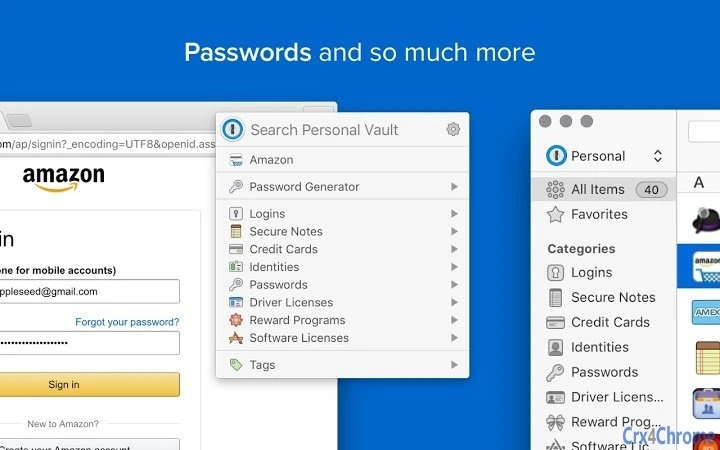
Description
1Password Chrome Extension for Secure Logins
Overview
The 1Password Chrome Extension is designed to enhance online security by enabling users to securely save, fill, and generate passwords directly within the Google Chrome browser. It serves as a bridge between the 1Password desktop application and web-based services, streamlining login workflows for individuals and teams who rely on strong, unique credentials. This tool is particularly useful for users managing multiple accounts across various platforms, reducing the risk of password reuse and unauthorized access.
Targeted at both individual users and professionals seeking improved digital identity protection, the extension supports secure authentication across personal and work-related websites. It integrates with the 1Password desktop app on Windows and Mac, ensuring consistent password management across devices. Real-world usage scenarios include logging into banking portals, email accounts, and SaaS platforms with minimal friction while maintaining high security standards.
The developer, 1Password, is known for its focus on privacy and robust encryption. The extension is part of a broader ecosystem that emphasizes user control over personal data. While specific details about the development team are not provided, the product’s alignment with established security practices suggests a mature, well-supported offering.
Key Features & Capabilities
- Seamless Password Filling – Automatically fills login credentials on supported websites using the 1Password desktop app as the source.
- Secure Password Generation – Creates strong, unique passwords with customizable length and character sets directly within the browser.
- One-Click Save – Saves new login details to the 1Password vault with a single click during account creation.
- Biometric Authentication Support – Leverages device-level authentication (e.g., Touch ID, Windows Hello) for secure access to stored credentials.
- Sync Across Devices – Ensures credentials are available across all devices where the 1Password desktop app is installed and synced.
These features are especially beneficial when signing up for new services or managing frequent logins. For example, users can generate a 16-character password with special characters and have it auto-filled without manual typing. The extension also reduces the risk of phishing by only filling credentials on verified websites, enhancing overall online safety.
User Interface, Workflow & Performance
The interface of the 1Password Chrome Extension is minimal and integrated directly into the browser’s toolbar. It appears as a small icon, typically located in the top-right corner, which expands into a clean menu when clicked. Navigation is straightforward: users select a login entry from their vault, and the credentials are automatically populated into the relevant fields.
Workflow efficiency is high, especially for users already familiar with the 1Password desktop app. The extension reduces repetitive typing and minimizes the chance of errors during login. It does not require additional configuration beyond installation and linking to the desktop application.
Performance observations are based on general software behavior patterns. The extension operates efficiently with low latency, ensuring fast loading and filling of credentials. The developer did not specify resource usage details. Stability is maintained through integration with the main 1Password application, which handles core processing and encryption.
Compatibility & System Requirements
The 1Password Chrome Extension is compatible with Windows and Mac operating systems. It requires the 1Password desktop app (Mac or Windows) to function, as it relies on the local vault for authentication and data access. The extension itself has a file size of 2.5 MB, indicating a lightweight installation.
Exact system requirements were not listed. However, since it runs within Google Chrome, compatibility with modern versions of the browser is implied. The extension supports the latest stable releases of Chrome on both platforms. Installation is handled through the Chrome Web Store, and no additional drivers or dependencies are required beyond the base desktop app.
Pros and Cons
Pros
- Effortless password filling and saving in Chrome
- Integrated with the trusted 1Password desktop application
- Supports strong, customizable password generation
- Enhances security with biometric authentication
- Lightweight at just 2.5 MB
Cons
- Requires the 1Password desktop app to function
- Not available for other browsers without additional tools
- Limited to users already invested in the 1Password ecosystem
- May require setup for first-time users unfamiliar with password managers
FAQ Section
Is the 1Password Chrome Extension free to use?
Yes, the extension is available at no cost. It is part of the broader 1Password suite, which offers a free tier with core password management features.
Can I use this extension without the 1Password desktop app?
No. The extension requires the 1Password desktop application on Windows or Mac to access and manage passwords. It cannot function independently.
Is my data secure when using this extension?
Yes. All data is encrypted locally on your device using 1Password’s zero-knowledge architecture. The extension does not store passwords or sensitive information on remote servers.
Does the extension work on browsers other than Chrome?
Currently, the extension is designed for Google Chrome. For other browsers, users may need to use alternative 1Password tools or the 1Password X browser experience.
How often are updates released for this extension?
Updates are delivered automatically through the Chrome Web Store. The developer regularly releases patches and improvements to maintain security and compatibility.
Final Thoughts + CTA
The 1Password Chrome Extension delivers a reliable, secure, and efficient way to manage online credentials within the browser environment. Its seamless integration with the desktop app makes it ideal for users who prioritize digital safety and workflow efficiency. While it is not a standalone tool, its role as a bridge between desktop and web enhances the overall 1Password experience.
Individuals and professionals managing multiple online accounts will benefit most from this utility. The combination of automatic password generation, secure filling, and biometric access ensures a robust defense against common online threats.
For those already using 1Password on their PC, this extension is a must-have addition. Download 1Password Chrome Extension now to strengthen your online security and simplify your daily login routine.
Guides & Tutorials for 1Password Beta Extension for Chrome
How to install 1Password Beta Extension for Chrome
- Click the Preview / Download button above.
- Once redirected, accept the terms and click Install.
- Wait for the 1Password Beta Extension for Chrome download to finish on your device.
How to use 1Password Beta Extension for Chrome
This software is primarily used for its core features described above. Open the app after installation to explore its capabilities.
User Reviews for 1Password Beta Extension for Chrome 0
No reviews found





